Carista users, whats the real deal, with this unit??

I recommend using the OBDLink MX+ OBD2 scanner. It works with Carista on my LC250. I can confirm that Carista will read error codes and allow you to reset them. For example, I had to disconnect my battery, and Carista showed all the communication errors and then allowed me to reset them. Zero errors after the reset.

Also, in response to the above: in the customization section, you can turn off the seat belt warning ding for all seats. This is different from the rear seat reminder. That was the most useful customization for me, but there are a few additional settings you can't set in the car's menu, such as:
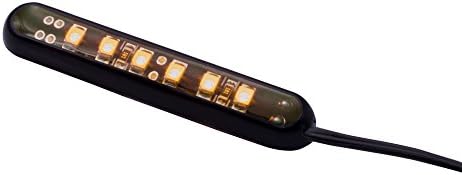
  • turn signal auto-flash count
  • signal click volume
  • auto open/close windows with the smart key
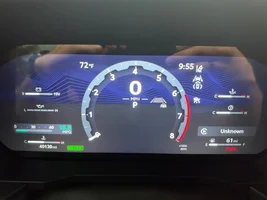
The biggest menu item missing for me is the option to change the temperature to Celsius. I hope that either Toyota or Carista adds that option at some point. Maybe one of you guys has a solution I'm not aware of.
Did you have Carista first? Or is there a reason you run your OBDLink MX+ scanner with Carista as opposed to its own software, OBDLink? Reason for the question is because the more I've tried to use Carista (with Evo adapter- Carista name for their OBDII scanner), the less satisfied I've become.

The latest for me is trying to read fuel tank data- I haven't found it in Carista let alone logged it. I have used the same Evo adapter with Car Scanner app (in free mode) and then was at least able to read the scaled tank data from the OBD variable. Carista seems to offer very limited access and also fails if there's no internet connection. Full disclosure: I have a year's subscription to Carista but it increasingly looks like I won't renew.
I chose the OBDLink MX+ because it supports a much broader software ecosystem. OBDLink lists dozens of compatible third-party apps, including Carista, OBD Fusion, FORScan Lite, BimmerCode, JScan, RealDash, and others, and it works with iOS, Android, and Windows.

I also have a Carista subscription and chose Carista mainly for the customization options. It also seems to read faults more granularly. For example, after I disconnected the battery for maintenance, the OBDLink app showed no errors, while Carista listed all of the communication errors that had occurred. The OBDLink app seems somewhat limited, but to be fair, I’ve focused more on customizing vehicle settings than on using it to diagnose faults.

It’s good to hear about your experience with the tank data. I’ll check that out. My main issue at the moment is that I still haven’t found a way to change the temperature unit from °F to °C.
 
I chose the OBDLink MX+ because it supports a much broader software ecosystem. OBDLink lists dozens of compatible third-party apps, including Carista, OBD Fusion, FORScan Lite, BimmerCode, JScan, RealDash, and others, and it works with iOS, Android, and Windows.

I also have a Carista subscription and chose Carista mainly for the customization options. It also seems to read faults more granularly. For example, after I disconnected the battery for maintenance, the OBDLink app showed no errors, while Carista listed all of the communication errors that had occurred. The OBDLink app seems somewhat limited, but to be fair, I’ve focused more on customizing vehicle settings than on using it to diagnose faults.

It’s good to hear about your experience with the tank data. I’ll check that out. My main issue at the moment is that I still haven’t found a way to change the temperature unit from °F to °C.
I could not get OBDLink to recognize the Evo adapter - I wanted to get a look at their software as I was considering the OBDLink MX + also as a solution for accessing (apparently low level) tank-level-sensor data. Still am considering it so anything you've noticed or notice about it may be helpful. Spendy little thing, isn't it!

Edit: Just reconsidered Carista regarding the customizations I did a few months ago. They were easy so you could try out different options easily to figure out what you want/wanted. Very worth it on that effort.
To my knowledge, the Evo Scanner only works with Carista. That's why I don't use it. Carista only supports a handful of third-party scanners. I do like Carista, but have only limited experience with this, so take what I say with a bag of salt.
 
To my knowledge, the Evo Scanner only works with Carista. That's why I don't use it. Carista only supports a handful of third-party scanners. I do like Carista, but have only limited experience with this, so take what I say with a bag of salt.
Definitely can run Evo with software other than Carista (I only used Car Scanner but I presume there are others). The reason for the posting(s) above were to show that Carista doesn't access OBD variables while other applications provide access to those same variables on the same hardware. In essence, Carista is deficient in ability to read/display/log OBD variables. And there's the additional issue of inoperability without an internet connection
 
Definitely can run Evo with software other than Carista (I only used Car Scanner but I presume there are others). The reason for the posting(s) above were to show that Carista doesn't access OBD variables while other applications provide access to those same variables on the same hardware. In essence, Carista is deficient in ability to read/display/log OBD variables. And there's the additional issue of inoperability without an internet connection
That is very good to know!
 
Definitely can run Evo with software other than Carista (I only used Car Scanner but I presume there are others). The reason for the posting(s) above were to show that Carista doesn't access OBD variables while other applications provide access to those same variables on the same hardware. In essence, Carista is deficient in ability to read/display/log OBD variables. And there's the additional issue of inoperability without an internet connection
Thank you for the correction. What app do you recommend?
 
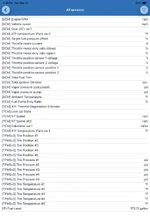
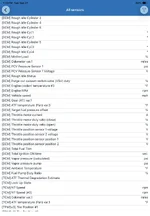
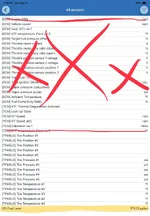
Just took a closer look at CAR SCANNER ELM OBD2 (available on Play and AppStore) and may have a better understanding? I did not see an easy way to adjust the many nanny system settings, many of which I found intolerable. Carista made that pretty painless and easy. I did find all of the variables below and many other functions. In short, CAR SCANNER ELM OBD2 seems to have capabilities that could brick your LC? I am only reading variables at this point, something that had more limited support in Carista. And CAR SCANNER ELM OBD2 is free with few limitations and $8 US lifetime full license making it a very low risk product. And I can confirm it runs without a WiFi connection. Here are the data items identified so far, note that the screen captures were done with the Land Cruiser off, so some values say unavailable or have wonky values. Everything seemed to straighten up with the system powered. Two random other notes- interesting that the entire 17.9 gallons of tank capacity shows up, see the yellow highlights [Edit: Found out why the tank shows 17.9 gallons- I entered it elsewhere and forgot. Suspect the entries are tank level sensor percentage x entered tank volume] AND you might be able to read real time tire tpms sensor temperatures!?! [Edit: Definitely can read TPMS sensor temp in each tire]

IMG_5788.webp

IMG_5789.webp

IMG_5790.webp
IMG_5791.webp

IMG_5792.webp

IMG_5793.webp
 

Attachments

  • IMG_5793.webp
    IMG_5793.webp
    109.8 KB · Views: 13
  • IMG_5792.webp
    IMG_5792.webp
    110.4 KB · Views: 12
  • IMG_5793.webp
    IMG_5793.webp
    127 KB · Views: 21
Last edited:
Back
Top Bottom