Software update complete..

OutandAbout

New member
📛 Founding Member
Joined
Jul 12, 2024
Messages
18
Media
1
Reaction score
10
Location
Chattanooga, TN
Vehicles
2024 LandCruiser
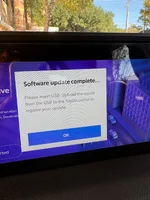
Has anybody seen this pop-up that comes up every time I start my LC since I had the screen update. The dealer dosen't have a clue, and I could not find anything in this forum.
FDB762C6-6E41-4712-93FA-10B5380C287F_1_105_c.webp
 
Same here, had the updated done last week and immediately got the pop-up on the next start-up. I've left several messages but the dealer has not returned my call. Initially thought, the tech was in a rush and forgot a step. He made a mess in my truck, removed everything in my glove box and center console and left it on the passenger seat and also left my air-tag on the dash (almost flew out when i made a left turn!!).
 

Attachments

  • IMG_8715.webp
    IMG_8715.webp
    449 KB · Views: 11
Same here, had the updated done last week and immediately got the pop-up on the next start-up. I've left several messages but the dealer has not returned my call. Initially thought, the tech was in a rush and forgot a step. He made a mess in my truck, removed everything in my glove box and center console and left it on the passenger seat and also left my air-tag on the dash (almost flew out when i made a left turn!!).
Interesting. The dealer is willing to come to me, drop off a loan car and take it back to thier shop to open a ticket with Toyota. But surely, this update has been available quite some time, there must be others that have had this happen tro them and have a fix for it. (Hate to hear about you crappy service experience!)
 
Same here. I'm literally sitting in the dealer waiting area while I hey try to sort it out. Really disappointed, this does not give me faith that Toyota has their software update procedure sorted properly.
 
Same here. I'm literally sitting in the dealer waiting area while I hey try to sort it out. Really disappointed, this does not give me faith that Toyota has their software update procedure sorted properly.
What timing. I assume you will give us an update when they figure it ou?
 
There's a code for the prompts that come up. I had this happen a bit ago on my GX, and my recollection is the tech made sure the update was current and cleared the code for the prompt.
 
What timing. I assume you will give us an update when they figure it ou?
Took about an hour for them to figure out, but all good. Apparently Toyota added a step to the software update process (they were supposed to get final info back from the system and upload it to Toyota for, uh, some purpose?) and didn't bother telling all the service shops. Sloppy.
 
Took about an hour for them to figure out, but all good. Apparently Toyota added a step to the software update process (they were supposed to get final info back from the system and upload it to Toyota for, uh, some purpose?) and didn't bother telling all the service shops. Sloppy.
Uploading all the images to mothership from the steering column camera??
 
I'm seeing something similar, but it states 'Checking USB Memory.' I can clear it by tapping the screen, as there's no OK button to clear, so at least that works.
 
So is this issue from when the dealer does the software update, rather than the OTA version?

Anyone who did the OTA update have this issue?
I did the first half of the OTA update, but haven't gotten to the 2nd part yet.
 
So is this issue from when the dealer does the software update, rather than the OTA version?

Anyone who did the OTA update have this issue?
I did the first half of the OTA update, but haven't gotten to the 2nd part yet.

I did mine over the air and (not to jinx things) haven’t had any issues yet.

As another member pointed out in a different thread, connecting your vehicle to home WiFi should get the second download happening and trigger installation of the update.


Thankfully no prompts on screen after installation in this manner.
 
I was a good boy and got it done in time at the dealership (no issues for me :) ), not like you slakers
 
Do you need to have the WiFi hot spot to get over tha air update or connect to home WiFi?

I got part 1 over the air no WiFi. It showed no part 2 available, until a few minutes after I connected the vehicle to home WiFi then it downloaded part 2 and installed successfully.

 
Back
Top Bottom