Cool Carplay Dashboard with OBD Scanner

dtxlcfe

Active member
📛 Founding Member
Joined
Sep 25, 2024
Messages
171
Media
104
Reaction score
210
Location
Dallas
Vehicles
2024 land cruiser 250 FE
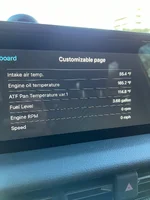
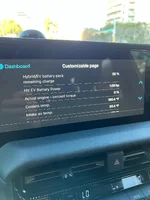
Thought I would share a cool 3rd party feature I have started using. I plug my Bluetooth OBD scanner in and link it via the Car Scanner app on IOS. I can then add tons of live data to a custom dashboard on the app that displays on my app carplay screen in real time. Here are some that I have been using recently. once you connect to the scanner via phone once, it does it automatically every startup after that so I can completely forget its there if I'm not using it but pull up anytime. also has 0-60 timer dashboard which I haven't played with yet. but there are a million different sensors and live calcs you can display to see how things are working live.
 

Attachments

  • IMG_5409.webp
    IMG_5409.webp
    229.4 KB · Views: 1,248
  • IMG_5408.webp
    IMG_5408.webp
    278.4 KB · Views: 897
Links to the product/app please?

From the developer's website:

Car Scanner is compatible with ELM327 based OBDII adapters, working via classic Bluetooth (ver.1.x, 2.x, 3.x), Bluetooth LE (4.0) or Wi-Fi, depending on your device operating system.
You can find one on eBay, Amazon, Aliexpress, Google or Bing using keywords “elm327 bluetooth” or “elm327 wifi”.
 
Cool thread! I actually used Car Scanner all the time with my before-LC non-Carplay car to check on things and just yesterday noticed that it has a Carplay functionality. Unfortunately, I left my OBD in my old car so it's currently unaccessible, but I was curious to see what it did for the LC.
 
Does the scanner use 12v battery power when the hybrid system is off?
 
Thought I would share a cool 3rd party feature I have started using. I plug my Bluetooth OBD scanner in and link it via the Car Scanner app on IOS. I can then add tons of live data to a custom dashboard on the app that displays on my app carplay screen in real time. Here are some that I have been using recently. once you connect to the scanner via phone once, it does it automatically every startup after that so I can completely forget its there if I'm not using it but pull up anytime. also has 0-60 timer dashboard which I haven't played with yet. but there are a million different sensors and live calcs you can display to see how things are working live.

Nice stuff, do you know if it shows details in metric system and temp in C instead of F?
 
Nice stuff, do you know if it shows details in metric system and temp in C instead of F?
I dont know for sure but I imagine you can change it to C
 
Does the scanner use 12v battery power when the hybrid system is off?
Device dependent, there is always 12VDC present so some devices may cause a parasitic draw and some may cause certain modules to not enter a sleep state which will cause a bigger draw.
 
Back
Top Bottom