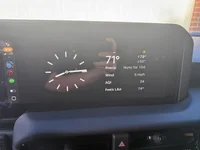
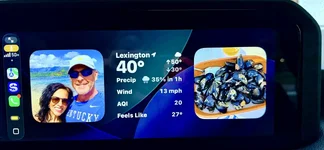
I have the 14 pro with 26.1 and wireless carplay works for me without issue. I really like the CarPlay widgets. Finally , a simple clock to display on screen instead of a bunch of icons.
I have the 14 pro with 26.1 and wireless carplay works for me without issue. I really like the CarPlay widgets. Finally , a simple clock to display on screen instead of a bunch of icons.
15 Pro Max, working fine wirelessly on 26.1 and I'm in and out of the LC all day. I do have rare, random disconnects, but there are so many variables that could cause that, including normal frequency interference. I just go into the Toyota settings and reconnect. Nothing is perfect.
15 Pro Max, working fine wirelessly on 26.1 and I'm in and out of the LC all day. I do have rare, random disconnects, but there are so many variables that could cause that, including normal frequency interference. I just go into the Toyota settings and reconnect. Nothing is perfect.
Trying 26.2 today. I generally run mine wired as I have been told music quality is much better wired and I like to keep charging, but mine does sometimes not connect properly wirelessly and it will drop out on Sirius XM from my app occasionally. I felt like it was much improved with IOS26. Will see what the new variation does today.
You’re not as far behind as you may think. Apple went from iOS 18 in 2024 to iOS 26 in 2025, as they changed their numbering methodology (it is now consistent across all of their operating systems).
I have mine on the analog clock and weather (which changes depending on your location), it's a peaceful screen lol. You can choose to display two items. This is even better on my p/u that has a giant screen.
After my initial connection glitch, IOS 26.1 has been staying connected since that first time. I haven't delved into any of the changes that IOD update brought yet.
After my initial connection glitch, IOS 26.1 has been staying connected since that first time. I haven't delved into any of the changes that IOD update brought yet.
It was available to me for about 2 days. I was going to research it, but never got around to it before the option to download it disappeared. Assumed it was a beta thing that met the number of test users they were looking for.