Garmin Power Switch question

Just received my Power Switch today, unfortunately still waiting for the LC to arrive at the dealer (hopefully this weekend).

Maybe a dumb question. Reading through the book, and reviewing the Power Switch, I see it has 2x Control Terminals. What are people using these for? Looking through the book, and this forum, it doesn't seem to be really used. I also received my M&R bumper light bar(s) today, which will be hooked up to the Power Switch.
I assume, IDK, that the switches are splint between two inputs (4 on one and 4 on another) That way you can have 4 switches are always powered and 4 that are only powered when the key is on. That's the way my clone is set up.
 
I assume, IDK, that the switches are splint between two inputs (4 on one and 4 on another) That way you can have 4 switches are always powered and 4 that are only powered when the key is on. That's the way my clone is set up.
Thanks that makes sense, thanks!
 
Just received my Power Switch today, unfortunately still waiting for the LC to arrive at the dealer (hopefully this weekend).

Maybe a dumb question. Reading through the book, and reviewing the Power Switch, I see it has 2x Control Terminals. What are people using these for? Looking through the book, and this forum, it doesn't seem to be really used. I also received my M&R bumper light bar(s) today, which will be hooked up to the Power Switch.
I set all my amber DRLs to come on when control 1 has power. Control 1 is wired to a fuse that is live when the ignition is on.
 
I set all my amber DRLs to come on when control 1 has power. Control 1 is wired to a fuse that is live when the ignition is on.
That seems like the way to go. Can you manually turn them off while the ignition is on? Meaning they turn on when the LC starts, but I can go into the app and kill them if I want, and keep the ignition on?
 
That seems like the way to go. Can you manually turn them off while the ignition is on? Meaning they turn on when the LC starts, but I can go into the app and kill them if I want, and keep the ignition on?
Unfortunately, no, their function is overridden and determined by the status of the control input. This should be a feature that Garmin adds, I have heard a lot of folks ask for this. Here is a VIDEO of a guy who figured out a work around and also explains the PowerSwitch in depth. BTW; I'm a huge fan of the PowerSwitch.
 
I ordered a Powerswitch kit from Blaze Offroad. I actually ordered a 5th Gen 4Runner kit in case it it doesn't work on the LC then i'll put on my TRDPro. Now to get up the nerve to install. :eek:
 
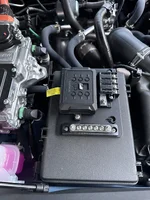
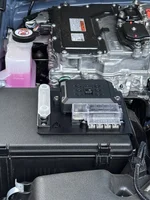
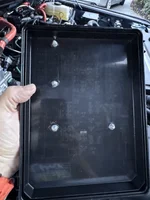
Had a break in the weather and got half the project done.
 

Attachments

  • IMG_4926.webp
    IMG_4926.webp
    266.5 KB · Views: 260
  • IMG_4927.webp
    IMG_4927.webp
    284.2 KB · Views: 191
  • IMG_4928.webp
    IMG_4928.webp
    113 KB · Views: 194
Has anyone had any issues with their Garmin PowerSwitch? I've had mine installed for about 1.5 years now and now it's having problems when I try to run my compressor. It has worked fine in the past. The specs from the compressor manufacturer is that it should draw a maximum of 23 Amps which is obviously under the max of 30 per accessory. However, mine immediately shuts down now with the notification on my app that the amperage was too high. I don't have any other accessories running so I know I'm not hitting the total of 100 Amps limit either.

To debug the issue, I hardwired the compressor directly to a positive terminal with a 15Amp fuse inline and the compressor ran fine without blowing the fuse. I've switched the compressor wire to a different terminal with the same results. Other accessories that draw a lower amount work. I don't have any higher amperage accessories I could plug in to see if they work.

Any thoughts?

Unfortunately, I found about this issue on my last road trip. Fortunately, I discovered it before I aired down on a trail.
 
Has anyone had any issues with their Garmin PowerSwitch? I've had mine installed for about 1.5 years now and now it's having problems when I try to run my compressor. It has worked fine in the past. The specs from the compressor manufacturer is that it should draw a maximum of 23 Amps which is obviously under the max of 30 per accessory. However, mine immediately shuts down now with the notification on my app that the amperage was too high. I don't have any other accessories running so I know I'm not hitting the total of 100 Amps limit either.

To debug the issue, I hardwired the compressor directly to a positive terminal with a 15Amp fuse inline and the compressor ran fine without blowing the fuse. I've switched the compressor wire to a different terminal with the same results. Other accessories that draw a lower amount work. I don't have any higher amperage accessories I could plug in to see if they work.

Any thoughts?

Unfortunately, I found about this issue on my last road trip. Fortunately, I discovered it before I aired down on a trail.
A solution would be to remove the compressor from the Garmin and place a relay controlled by the Garmin which would then power the compressor.
 
A solution would be to remove the compressor from the Garmin and place a relay controlled by the Garmin which would then power the compressor.
Nooo.....I want to continue to think INSIDE the box. :)

I may look at this approach, however, I've considered removing the compressor from the Garmin altogether and using a "hard" switch instead. It struck me after I discovered it on my trip that more "critical" things should probably be set up more simply. I had solved in my head how to hardwire it directly if an emergency arose but it forced a re-thinking of what I plug into the fancy but perhaps trouble-prone new technology.

Right now, the irritating thing is not knowing WHY it's a problem.
 
Nooo.....I want to continue to think INSIDE the box. :)

I may look at this approach, however, I've considered removing the compressor from the Garmin altogether and using a "hard" switch instead. It struck me after I discovered it on my trip that more "critical" things should probably be set up more simply. I had solved in my head how to hardwire it directly if an emergency arose but it forced a re-thinking of what I plug into the fancy but perhaps trouble-prone new technology.

Right now, the irritating thing is not knowing WHY it's a problem.
I just don't trust running, IMO, critical components with anything electronic. Blu-tooth switches are great for lights etc....... but I usually build in a hard-wire bypass into the wiring. As an example in my starter relay anti-theft system, I included an extra wire that when touched to a ground, bypasses all the fancy switches and as a failsafe, I also have the OEM relay that can be easily swapped back in.

Been stranded too many times by something stupid.
 
Supporting Vendors View all →
StickerFab
Back
Top Bottom